PatreonSpeedTrapPlugin
启用 Shutoko Revival Project 上的测速点。
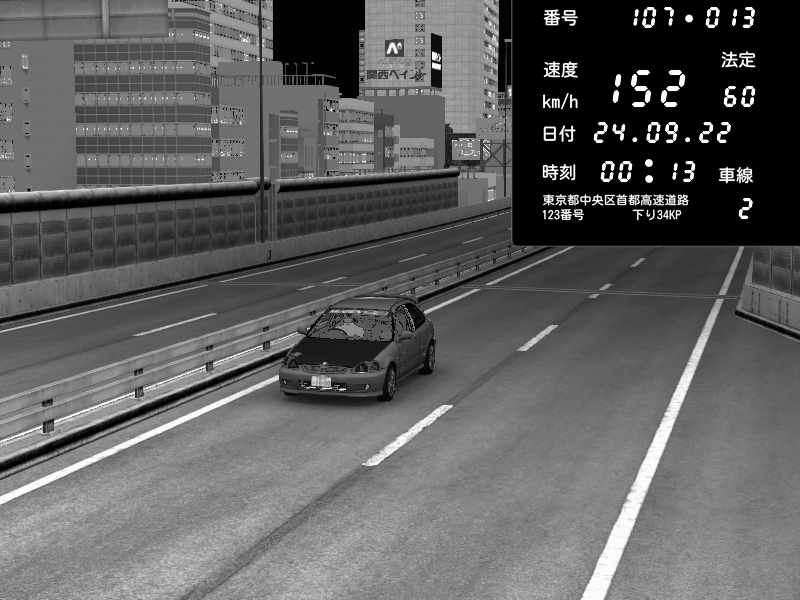
如果玩家以超过 100km/h 的速度驶过测速点,会看到一道红色闪光,并且证据照片还可以选择发送到 Discord 频道。
备注
需要强制最低 CSP 版本 0.1.77 (1937),并且在 extra_cfg.yml 中设置 EnableClientMessages: true!
警告
启用证据照片后,图片上传可能导致客户端卡顿!
此外,图像处理对服务器 CPU 的负担较大。如果你的服务器运行在性能很弱的机器上,请不要使用此功能。
测速点位置地图(感谢 CaptFingerpaint!)
配置
在 extra_cfg.yml 中启用该插件
extra_cfg.yml
EnablePlugins:
  - PatreonSpeedTrapPlugin
参考配置
plugin_patreon_speed_trap_cfg.yml
# This number will be added to the picture ID. It can be used to identify different servers by their ID
NumberOffset: 0
# Enable evidence picture processing
EnablePictures: true
# Enable image overlay to make it look like a real Japanese speed trap image
EnableOverlay: true
# Convert image to grayscale
Grayscale: true
# Allow players to disable picture upload. Can be helpful for people with a slow internet connection
AllowDisablingPictureUpload: true
# Enable debug app for cameras
Debug: false
DiscordWebhook:
  # Discord webhook URL for evidence pictures
  Url: "https://discord.com/api/webhooks/..."
  # Avatar URL of the bot
  PictureUrl: ""
  # Username of the bot
  Username: "Speed Trap"
  # Template for the message in Scriban format.
  # Possible variables: SpeedTrapId, Counter, Name, Speed, AllowedSpeed, Lane
  MessageTemplate: "Speed Trap {{ SpeedTrapId | math.format \"000\" }}・{{ Counter | math.format \"000\" }}\r\nDriver {{ Name }}"
# Define custom speed traps here if you are not using SRP
CustomSpeedTraps:
- # ID of speed trap
  Id: 1
  # Position of detection line
  Position: {X: -192.78, Y: -82.89, Z: -426.28}
  # Forward vector of detection line
  Forward: {X: -195.07, Y: -82.9, Z: -425.97}
  # Radius around detection point
  RadiusMeters: 10
  # Camera position
  CameraPosition: {X: -202.15, Y: -76.31, Z: -424.98}
  # Direction of camera
  CameraLook: {X: 0.81, Y: -0.58, Z: -0.05}
  # Camera FOV
  CameraFov: 60
  # Allowed speed, speed trap will not trigger when speed is below this value
  AllowedSpeedKph: 20
  # Enable red flash
  EnableFlash: true
  # Name of mesh that is turned into a red emissive (optional, when in doubt leave empty)
  MeshName:
自定义图像覆盖层
图像可以通过 Lua 完全自定义。默认覆盖层的源代码位于插件文件夹的 lua/script.lua 中。
该插件使用 ImageMagick(更确切地说是 Magick.NET)来处理图像。
自定义测速点
如果你想在 SRP 以外的地图上使用该插件,可以定义自定义测速点位置。
Position 和 Forward 的取值方法与 PatreonTimingPlugin 相同。
摄像头位置可以使用游戏内的测速点调试应用找到。设置 Debug: true 即可启用该应用。
可以通过聊天应用中的灯泡图标打开。
以下是在 Imola 第一弯 300m 标牌处设置测速点的示例:
CustomSpeedTraps:
  # ID of speed trap
  - Id: 1
    # Position of detection line
    Position: { X: -192.78, Y: -82.89, Z: -426.28 }
    # Forward vector of detection line
    Forward: { X: -195.07, Y: -82.9, Z: -425.97 }
    # Radius around detection point
    RadiusMeters: 10
    # Camera position
    CameraPosition: { X: -202.15, Y: -76.31, Z: -424.98 }
    # Direction of camera
    CameraLook: { X: 0.81, Y: -0.58, Z: -0.05 }
    # Camera FOV
    CameraFov: 60
    # Allowed speed, speed trap will not trigger when speed is below this value
    AllowedSpeedKph: 20
    # Enable red flash
    EnableFlash: true
    # Name of mesh that is turned into a red emissive (optional, when in doubt leave empty)
    MeshName:
已知问题
如果服务器路径中包含非 ASCII 字符(如西里尔字母等),该插件将无法工作。