AssettoServer Hub
简介
AssettoServerHub 是多个 AssettoServer 实例的中央数据存储。它允许服务器之间共享排行榜、 黑名单、白名单等内容,未来还将支持更多。
快速开始
首次启动 AssettoServer.Hub 时,会生成一个名为 configuration.yml 的默认配置文件。
使用服务器地址和生成的密钥,通过加载并配置 PatreonHubPlugin 来连接 AssettoServer 实例。
网页界面
网页界面可以通过你在配置中指定的 HttpPort 访问,例如 http://yourip:8000。你也可以在这里查看演示。
如何添加更多服务器
你可以像下面这样添加更多的 Name 条目,来接入更多服务器:
# Port that the hub will listen for server (gRPC) connections
GrpcPort: 5085
# Port that the hub will listen on for the web interface
HttpPort: 8000
# Name of the hub, will be shown in web page titles
HubName: AssettoServer Hub
# Filename of main logo in wwwroot/images
MainLogoFile: logo.svg
# Filename of logo shown in nav bar in wwwroot/images
NavbarLogoFile: logo.svg
# List of keys that are allowed to connect to the hub. Do not share these keys with other people!
Keys:
- Name: server-1
- Name: another-server
- Name: server-3
# List of file-based user groups
FileBasedUserGroups:
  - Name: blacklist
    Path: blacklist.txt
  - Name: whitelist
    Path: whitelist.txt
启动 Hub 后,系统会为每个尚未拥有密钥的条目自动生成密钥。然后,你可以将生成的密钥 填入你的 AssettoServer 配置中。
如何在排行榜中使用友好的车辆/赛道名称
在加载了 PatreonHubPlugin 的游戏服务器上,以管理员身份登录,然后通过聊天中的锤子图标选择 AssettoServer Hub:
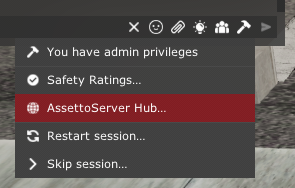
点击 Upload car/track names。
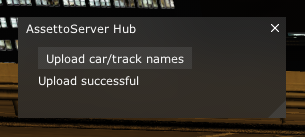
之后,排行榜将使用正确的名称(例如 Nissan Skyline GT-R R34 V-SPEC Performance,而不是 nissan_skyline_r34_v-specperformance)
工作原理
AssettoServerHub 和 AssettoServer 之间使用 gRPC 通信。数据存储在名为 Hub.db 的 SQLite 数据库中。